

z/OS Agentic AI · Batch + Interactive Workspace

Connect/MP Connect/Web

AI Inference for z/OS —
Any Model. Zero Assembly.Connect/AI

Powered by Connect/Web Watch Demo
z/OS Linux x86 Windows macOS

Native

z/OS Agentic
AI Platform

No JVM

No
Middleware

Zero

Application Code
Changes

3

Inference Model
Targets

SAF

Access
Control

TLS

Native z/OS
End to End

5

Output
Destinations

Enterprise AI on z/OS—scheduled in batch or interactive at your desk, secure and agentic.

Select mode ›

Embed AI into your z/OS batch jobs — on your terms.

Connect/AI lets you add powerful inference directly into existing batch workflows with zero application changes. Choose your model strategy:

  • Mainframe Models — Run natively on IBM z17 (Telum II / Spyre) for maximum security, lowest latency, and zero data movement.
  • Local/Cloud Models — Access local and powerful external models when you need specialized capabilities or higher intelligence.

Inference Mode
A simple JCL step sends your data and receives a structured response. Conversation history is preserved automatically across steps, allowing each inference to build on the last — perfect for pipeline-style processing.

Agentic Mode
The same JCL step can launch a full reasoning agent. It plans, acts on z/OS resources (submitting jobs, reading/writing files, driving Connect/3270 sessions), observes results, and iterates until the task is complete.

All execution runs under the job’s native z/OS identity with full SAF security, auditing, and compliance. Whether using local or cloud models, your data stays protected and governed by your existing policies.

Reliable, auditable AI inside your batch window — no middleware required.

* Connect/3270 required for Agentic 3270.

* Coming soon.

JCL
JES
JES
Files
Connect/3270
3270*
Connect/AI
CONNECT/AI
Batch
prompt / request
inference result
INFERENCE
MODEL
Mainframe | Local | Cloud
act / observe
AGENTIC
multi-level iterative loop
reason
AGENT EXECUTION
ACT
call z/OS resource
Files
Agentic 3270
OBSERVE
Structured result
REASONING
REASON
plan next step
Batch AI Inference
Enterprise-grade Security

Connect/AI runs as a native z/OS process, giving every prompt, model interaction, and dataset the same SAF access controls, audit policies, and System SSL encryption as your most critical mainframe workloads — keeping AI workflows safe, controlled, and fully accountable.

Why Connect/AI

Any Model. Any Data. Batch or Interactive—Natively on z/OS.

Click any card to expand details.

Resources

Connect/MP › Connect/AI

Watch Demo — Interactive AI Workspace

Like what you see? Schedule a Live Demo.

Book a Time  

Connect/MP › Connect/AI

Features

Connect/MP › Connect/AI

Use Cases

Connect/AI — Use Cases

AI inference, where your data already lives.

Connect/AI brings intelligence to mainframe batch workflows — without moving your data, rewriting your applications, or learning new tooling for data preparation. Raw mainframe data uses the tools you already know: DFSORT, IDCAMS REPRO, REXX, COBOL, DB2 extraction tools, SMF extraction tools, JCL SORT.

Pipeline: Source data Prepare & normalise Connect/AI inference Output & route

Financial Services

AI-assisted fraud narrative generation

A retail bank's fraud team reviews hundreds of flagged transactions daily, each requiring manual cross-referencing before writing a case narrative. Raw VSAM transaction records contain packed decimal amounts, internal offsets, and system codes irrelevant to the analyst. A REXX script flattens the VSAM structure and converts packed decimal values to readable form; DFSORT filters the output to the 12 fraud-relevant fields and caps record volume. Connect/AI passes each prepared record with a structured prompt to a cloud model, writing a plain-language case summary back to dataset for analyst review each morning.

Pipeline

Source

VSAM flagged transactions

packed decimal, raw fields

Prepare

Flatten + filter to 12 fields

decoded values, sized payload

REXX + DFSORT

Infer

Connect/AI

cloud model, narrative prompt

Output

Case narrative dataset

analyst review queue

Outcomes

  • Case prep time reduced from 25 mins to under 5
  • VSAM flattening handled by existing REXX skills
  • DFSORT controls field selection and payload size
  • Audit trail maintained entirely on z/OS

“Our analysts were spending half their morning writing up what the system already knew. Now they spend it deciding what to do about it.”

— Fraud Operations Manager, regional bank

Insurance

Automated policy exception commentary

A life insurer runs nightly batch processing across millions of policies. When a policy hits an exception — lapse risk, beneficiary conflict, underwriting anomaly — it is written to a VSAM KSDS with a deeply nested, repeating-group structure. Compliance rules prohibit policyholder data leaving the on-premises environment. IDCAMS REPRO extracts the relevant exception records; a COBOL program restructures the variable-length records into a consistent flat layout, normalises date and currency fields, and strips fields not relevant to the exception type. Connect/AI targets a locally-hosted inference model, generating a plain-English explanation and suggested resolution path for each exception.

Pipeline

Source

VSAM KSDS exceptions

nested repeating groups

Prepare

Extract, restructure + normalise

flat layout, stripped fields

IDCAMS + COBOL

Infer

Connect/AI

local model, exception prompt

Output

Annotated exception report

operations team queue

Outcomes

  • Policyholder data never leaves on-premises
  • COBOL normalisation reuses existing program skills
  • Exception queue resolution time cut by 40%
  • Compliance posture unchanged

“We couldn’t send customer data to a cloud API — full stop. The local model option meant we didn’t have to choose between AI and compliance.”

— Head of Policy Operations, life insurer

Government

SMF-based capacity insight reporting

A government agency’s infrastructure team produces weekly capacity reports from SMF record types 30, 70, and 72 — covering CPU utilisation, DASD activity, and WLM metrics. Raw SMF data arrives as undecoded binary records, previously handled by a mix of SAS macros and manual effort. Standard SMF extraction tools decode the binary records to a workable sequential format; a REXX script then normalises field representations and aggregates readings to hourly intervals to reduce inference payload size, flagging records that breach capacity thresholds. Connect/AI passes the prepared dataset to a z/OS-hosted model requesting a trend summary and risk narrative, delivered by email to infrastructure management before the weekly review.

Pipeline

Source

SMF types 30, 70, 72

binary, undecoded

Prepare

Decode, normalise + aggregate

hourly intervals, threshold flags

SMF tools + REXX

Infer

Connect/AI

z/OS model, capacity prompt

Output

Email — infra management

weekly review ready

Outcomes

  • SMF decode automated using standard extraction tools
  • REXX aggregation replaces manual SAS macro work
  • Capacity risks surfaced before the review meeting
  • All processing sovereign — no data leaves z/OS

“We were spending more time preparing the SMF data than reading it. Now the report lands in our inbox already interpreted.”

— Infrastructure Manager, government agency

Mainframe Operations

Direct JES report inference for job failure triage

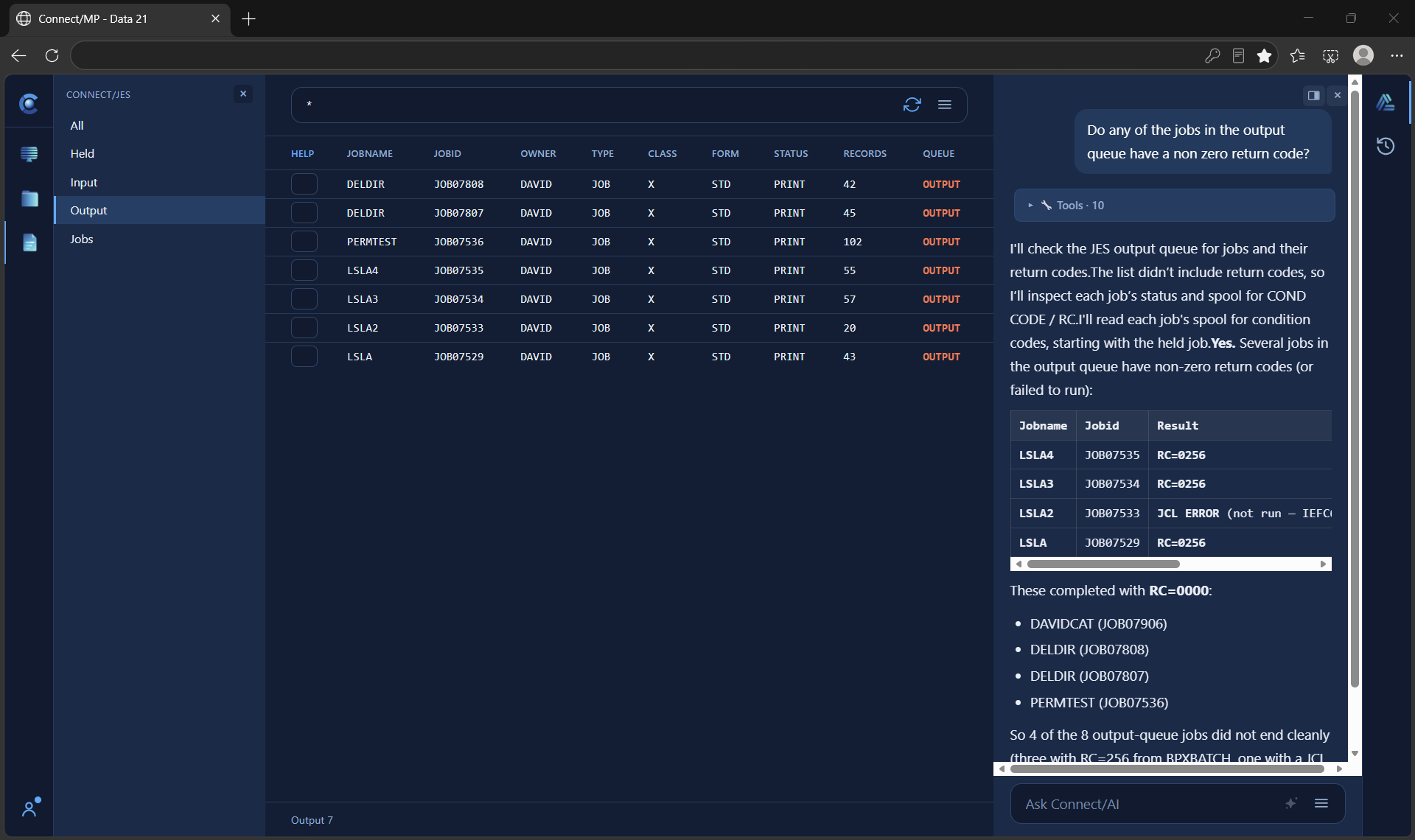
A mainframe operations team runs hundreds of batch jobs daily via JES2. When jobs fail or produce anomalies, operations staff manually scan spool output — JESMSGLG, JESJCL, SYSOUT — to identify root causes. With Connect/AI, the raw JES report is passed directly to the inference model, which understands fixed-width columnar formats, JCL syntax, and standard IBM message codes natively. No ETL, field extraction, or data preparation pipeline is required. The model reads the spool output as-is, identifies the failing step, interprets the relevant system messages, and drafts a triage summary routed to the operations team via Connect/Hybrid.

Pipeline

Source

JES spool output

JESMSGLG, JESJCL, SYSOUT — unmodified

No Prepare Step

Spool passed directly

fixed-width format, IBM codes read natively

Connect/AI

Infer ×1

Triage + summarise

failing step, message codes, probable cause

Output

Connect/Hybrid → ops queue

triage summary for operator review

Outcomes

  • No ETL or field-mapping pipeline required
  • JES report format understood without pre-processing
  • IBM system message codes interpreted in-context
  • Faster mean time to triage on batch job failures
  • No changes to existing JES2 job definitions

“We’ve been staring at spool output for thirty years waiting for something to read it for us. Now it just does — no reformatting, no middleware, nothing.”

— Operations Lead, financial services mainframe team

Logistics

Intelligent exception routing for supply chain events

A global logistics operator processes millions of shipment events daily through a z/OS core system, with exception records stored in DB2. Each record contains the full shipment history — hundreds of columns including rate tables, routing history, and carrier codes — far exceeding what an inference model needs. A DB2 extraction tool selects only current-day exceptions; DFSORT filters to the 15 impact-relevant fields and translates internal carrier and status codes to human-readable equivalents via a lookup. A two-step inference job follows: a lightweight local model classifies severity; for high-severity events only, a cloud model drafts a customer communication, routed via Connect/Hybrid into the CRM for agent review.

Pipeline

Source

DB2 shipment exceptions

full history, internal codes

Prepare

Extract, filter + decode

15 fields, readable values

DB2 tools + DFSORT

Infer ×2

Classify → draft comms

local triage + cloud (high severity)

Output

Connect/Hybrid → CRM

agent review queue

Outcomes

  • DB2 extraction uses existing toolchain — no new skills
  • DFSORT lookup handles code translation in-pipeline
  • Cloud API costs limited to high-severity events only
  • No mainframe application changes required

“Using a cheap local model to triage and a powerful cloud model only when it counts — that’s the kind of cost control our CFO actually understands.”

— VP Infrastructure, global logistics operator

Performance Engineering

AI-driven Omegamon performance analysis and reporting

A z/OS performance engineering team monitors system health using IBM Omegamon — navigating multiple 3270 monitor screens daily to assess CPU, memory, I/O, and address space activity. Producing the weekly capacity and incident trend report requires manually visiting Omegamon screens, transcribing key metrics, and composing a narrative summary — typically a half-day task. A Python script automates the entire collection process through Connect/3270; DFSORT or REXX step merges and sizes the multi-screen data; Connect/AI then passes the prepared dataset to a cloud model requesting anomaly detection, trend commentary, and a recommended actions summary. The finished report is emailed to the performance team and uploaded via FTP to the infrastructure document store.

Connect/3270 + Connect/AI working together. Connect/3270 provides programmatic 3270 session access — eliminating manual screen navigation. Connect/AI handles inference and reporting. Neither product requires changes to Omegamon or the underlying z/OS configuration.

What gets captured — CPU Activity Screen

LPAR · timestamp · CPU dispatch %, zIIP %, wait % · top resource-consuming jobs by name, type, and CPU share

Pipeline

Source

Omegamon 3270 screens

live monitor data

Collect

Navigate + capture

structured data per screen

Python + Connect/3270

Prepare

Merge + size payload

combined, filtered

DFSORT / REXX

Infer

Connect/AI

anomaly + trend analysis

Output

Email + FTP

perf team + doc store

Outcomes

  • Weekly report prep reduced from half a day to an overnight scheduled job
  • Screen navigation fully automated — no engineer involvement in data collection
  • AI identifies anomalies across all screens simultaneously
  • Omegamon untouched — no configuration changes required
  • Output delivered by email and FTP — no new tooling for consumers

“We’ve been staring at those Omegamon screens for twenty years. This is the first time the system has told us what they mean rather than just showing us the numbers.”

— Senior Performance Engineer, financial services firm

Developer Productivity

Interactive prompt development and data exploration

A developer building a new fraud-narrative batch job needs to tune the prompt template before scheduling it. Rather than submitting a test job and waiting for each result, they open the Connect/AI workspace, load a sample of prepared records, and iterate on the prompt in real time — adjusting wording, comparing model outputs side by side, and confirming the output format. Once satisfied, the same prompt drops straight into the production JCL step. The interactive workspace and scheduled batch share one engine, so what works live works in production.

Outcomes

  • Prompt tuning cycle cut from hours to minutes
  • No test batch submissions required to iterate
  • Same prompt promotes directly into production JCL
  • Sample data never leaves z/OS

“We used to burn a morning submitting test jobs to get one prompt right. Now it’s a few minutes in the browser, then it goes straight to batch.”

— Application Developer, retail bank

Mainframe Operations

Agentic incident triage across live mainframe data

When a production batch stream fails overnight, an on-call operator opens the workspace and asks Connect/AI to investigate. Acting agentically, it retrieves the relevant JES spool, reads the failing step and system messages, checks related datasets, and proposes a root cause and remediation — carrying context across each step and surfacing its reasoning as it goes. The operator confirms the fix without hand-scanning spool output across multiple jobs. The same agentic engine can then be scheduled to triage failures automatically and route summaries to the on-call queue.

Outcomes

  • Multi-step investigation runs autonomously
  • Operator reviews reasoning, not raw spool
  • Faster mean-time-to-resolution on job failures
  • All access under SAF, entirely on z/OS

“It reads the spool, connects the dots, and hands me a hypothesis. I decide — it does the legwork.”

— Operations Lead, insurance carrier

Connect/MP › Connect/Web › Connect/AI

The Web AI Workspace — Your Native z/OS AI Console

A powerful, browser-based AI console that brings true agentic intelligence directly to your mainframe environment. Unlike simple chat interfaces, it enables multi-step iterative reasoning and autonomous execution — all running natively on z/OS with full security and control.

  Scroll to see all columns

Function Description Value for Mainframe Users
Multi-Step Iterative Reasoning AI can break down complex tasks, plan steps, execute, observe results, and loop until the goal is achieved True agentic workflows from a single prompt
Tool Use & Integration Connects to external tools (files, JES, 3270, databases, etc.) in real time Direct action on z/OS resources
Live Screen Interaction Reads and navigates 3270 screens, extracts the data Agentic 3270 automation
Real-time Observation & Feedback Shows reasoning steps, intermediate results, and final output Transparency and control
Interactive Prompting Users can guide, correct, or continue the agent mid-process Human-in-the-loop capability
Conversation Memory Maintains context across multiple steps and sessions Complex, long-running tasks
Structured Output Returns clean, structured data, summaries, reports, or actions Easy integration with downstream processes
Model Flexibility Switch between mainframe, local, or cloud models on the fly Balance cost, security, and capability
Audit & Security All actions run under the user’s SAF identity with full logging Enterprise compliance
Browser-Based Access No installation — works from any authorized desktop High productivity for analysts & developers

This console allows analysts, developers, and operations teams to perform complex, multi-iterative tasks using a single prompt — combining reasoning, live 3270 interaction, file/JES operations, and more — without leaving the browser.

Connect/AI  ·  Data 21

Schedule a Live Demo.

Book a time  
Data 21 Enterprising Software

Data 21, the Data 21 logo, and all other Data 21 software product and service names are trademarks of Data 21. All other trademarks belong to their respective companies. © Copyright 2026 Data 21. PKZIP®, PKWARE®, SecureZIP® are trademarks of PKWARE® and are not affiliated with Data 21.

Data 21

About Data 21

Founded in 1980, Data 21 Inc. is a veteran-owned enterprise software company headquartered in California. For over 45 years, we have delivered innovative, reliable, high-performance mainframe-centric solutions that power today’s connected enterprise.

Our software is embedded in the critical daily operations of hundreds of enterprises worldwide — a testament to our commitment to exceptional engineering and long-term client success. We don’t just support our customers; we evolve alongside them.

At Data 21, the mainframe isn’t a legacy constraint — it’s a strategic foundation.

This site uses cookies. By continuing to browse our site you are agreeing to our use of cookies.

Connect/AI